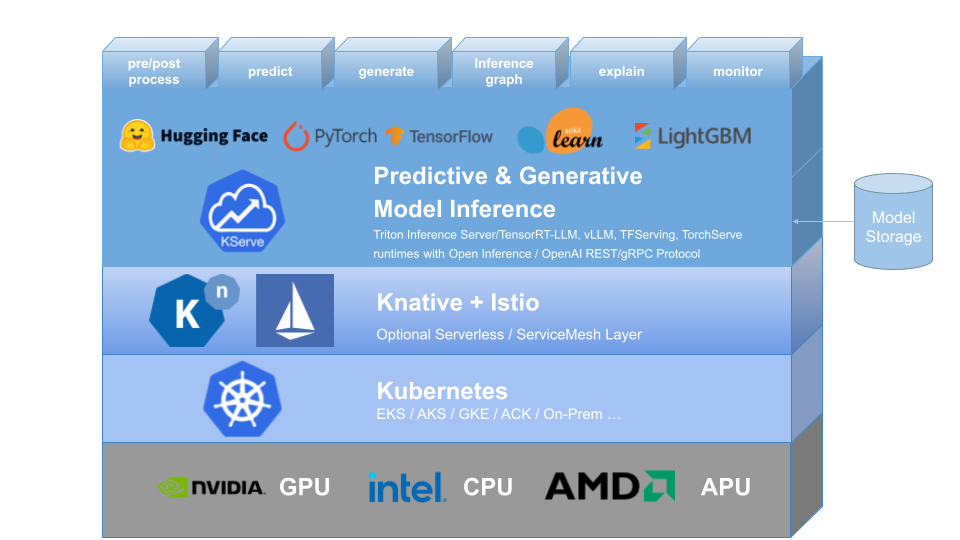
Deploying ML and generative AI at scale is hard. Done well, KServe plus Knative turns Kubernetes into a serverless, reliable model platform with autoscaling, versioning, and strong observability.
Teams run everything from scikit-learn to large language models (LLMs) in production. The bar is higher now: we need fast cold starts, safe rollouts, cost control on GPUs, and strong security across teams. Traffic is also spike‑driven, especially for chat and batch workloads. A serverless model layer on Kubernetes lets us scale to meet peaks and shrink when demand falls.
Within the SAP AI Core team, we use KServe (formerly KFServing) for AI/ML model serving, complemented by Knative for serverless orchestration features such as auto-scaling and traffic management. This combination lets us run both predictive and generative AI workloads efficiently in the same Kubernetes environment.
What the platform actually does
KServe abstracts much of the day‑two work for model hosting: consistent networking, request routing, revision control, model caching, and GPU support. It ships built‑in model servers for TensorFlow, PyTorch, ONNX, scikit‑learn, XGBoost, and NVIDIA Triton, and supports custom runtimes when you need one.
Knative Serving provides dynamic autoscaling, scale‑to‑zero, and traffic management. It handles blue‑green and canary rollouts and routes traffic between revisions with a simple, declarative spec.
Deployment modes that fit real workloads
- Knative Serverless mode: best when traffic is bursty or cost control matters. It adds scale‑to‑zero, fast scale‑out, and built‑in rollouts.
- RawDeployment (standard Kubernetes) mode: best for long‑lived GPU pods or large LLMs with big caches. You keep direct control with Deployments, Services, and the Horizontal Pod Autoscaler (HPA).
Pick Knative for flexible, on‑demand inference. Pick RawDeployment when you must pin GPUs and avoid cold starts at all costs.
Why we use KServe as part of AI Core infra
Multi‑framework support
KServe speaks TensorFlow, PyTorch, ONNX, scikit‑learn, XGBoost, and NVIDIA Triton, and integrates cleanly with custom runtimes such as vLLM for LLMs. One InferenceService spec, many backends.
Autoscaling and resource optimization
KServe uses Knative’s autoscaler and Kubernetes HPA (Horizontal Pod Autoscaler). With KEDA (Kubernetes Event‑Driven Autoscaling), you can scale on custom metrics such as queue depth, GPU load, or token throughput. Knative mode supports scale‑to‑zero for idle endpoints; RawDeployment favors steady GPU use.
Model versioning and canary rollouts
Each deploy creates a revision. You can split traffic between versions for A/B tests, push a canary at 10%, and auto‑roll back on errors. Knative manages the routing; KServe keeps the model context consistent across revisions.
LLM‑focused performance
KServe 0.15+ improves LLM serving with vLLM and other accelerated backends: paged‑attention for KV cache, token rate limits, streaming outputs, and batch scheduling. These keep GPUs busy and reduce tail latency during spikes.
Standardized inference protocol
KServe implements the V2 inference protocol over REST and gRPC. You get consistent health checks, metadata, model management, and infer endpoints—no custom glue per framework.
Observability and monitoring
Native Prometheus metrics cover latency, throughput, error rates, and GPU use. Grafana dashboards visualize hot paths and help you set alerts. You can also export custom events from your server logic.
Security and multi‑tenancy
Use Kubernetes RBAC (Role‑Based Access Control) to isolate teams and workloads by namespace. Capsule Operator and network policies add soft and hard fences for shared clusters.
Run the workflow on your own
Below is a minimal path to a working, observable endpoint. Check the docs for the latest versions before you run this in production.
- Install Knative Serving (for serverless mode)
kubectl apply -f https://github.com/knative/serving/releases/download/v1.4.0/serving-crds.yaml
kubectl apply -f https://github.com/knative/serving/releases/download/v1.4.0/serving-core.yaml
kubectl apply -f https://github.com/knative/net-kourier/releases/download/v1.4.0/kourier.yaml
kubectl patch configmap/config-network -n knative-serving --type merge \
  --patch '{"data":{"ingress.class":"kourier.ingress.networking.knative.dev"}}'
kubectl get pods -n knative-serving
- Install cert‑manager and KServe
kubectl apply -f https://github.com/cert-manager/cert-manager/releases/download/v1.17.0/cert-manager.yaml
helm install kserve-crd oci://ghcr.io/kserve/charts/kserve-crd --version v0.15.0 -n kserve --create-namespace
helm install kserve oci://ghcr.io/kserve/charts/kserve --version v0.15.0 \
  --set kserve.controller.deploymentMode=Knative -n kserve
kubectl get pods -n kserve
- Deploy an InferenceService Use the built‑in protocol and a custom runtime (vLLM shown here). For LLMs, plan for GPU and memory.
apiVersion: serving.kserve.io/v1beta1
kind: InferenceService
metadata:
  name: my-llm
  namespace: default
  annotations:
    serving.kserve.io/enable-prometheus-scraping: "true"
spec:
  predictor:
    model:
      storageUri: "s3://my-bucket/llm-model/"
      runtime: kserve-vllm
      resources:
        limits:
          cpu: "4"
          memory: "16Gi"
          nvidia.com/gpu: 1
Apply it:
kubectl apply -f my-llm.yaml
Tune autoscaling and canary Use Knative/KEDA to scale on latency, queue depth, or GPU load. For a careful upgrade, split a small share of traffic to the new revision, then raise it as errors stay flat. See KServe traffic split docs for the exact YAML for your version: https://kserve.github.io/website/
Add monitoring Enable Prometheus scraping with the annotation above and wire a ServiceMonitor if you use the Prometheus Operator. Build a Grafana panel for p50/p95 latency, error rate, and token throughput for LLMs.
Quick test against V2 infer:
curl -s http://$HOST/v2/models/my-llm/infer \
  -H "Content-Type: application/json" \
  -d '{"inputs":[{"name":"prompt","shape":[1],"datatype":"BYTES","data":["hello"]}]}'
What we saw in practice
We rolled 10% traffic to a new vLLM runtime. Error rates ticked up within three minutes, and Knative held the cap. We widened the token budget, nudged concurrency down by one, and retried—this time it held steady. In our experience, two knobs matter most for LLMs: request concurrency per pod and token rate per GPU. Keep GPU use high but steady; let autoscaling handle bursts.
Where it breaks (and how to fix it)
- Cold starts on large LLMs: scale‑to‑zero can mean slow first tokens. Fix: set minScale>0 for hot pods, pre‑pull images, or use RawDeployment for always‑on GPUs.
- GPU fragmentation: small pods can strand VRAM. Fix: right‑size requests, consider node pools by GPU model, and use a single larger pod per GPU where possible.
- Model load time: large weights delay readiness. Fix: store models in nearby object storage, enable model caching, and load a small “starter” model for health checks.
Best practices that hold up
Start with small, optimized images to cut cold starts and reduce the attack surface. Set resource requests and limits with real traffic traces, not guesses. Put large models in object storage (S3, GCS, or MinIO) and let KServe fetch on start. Always roll out with traffic splits, watch error rate and latency, and roll back fast. Add Prometheus and Grafana on day one and alert on saturation early. Apply RBAC and network policies before you add a second team.
KServe and Knative give us a single, scalable way to serve both predictive ML and generative AI on Kubernetes. The trade‑off is clear: serverless saves cost but can hurt LLM cold starts. Start with one model in its own namespace, add Prometheus dashboards, and try a 10% canary to the next revision. From there, turn the autoscaling knobs and watch p95 settle before you grow the fleet.
Notes
- Verify versions against the docs before running in production: KServe (v0.15+), Knative, and cert‑manager move fast.
- V2 protocol details and KServe traffic split examples: https://kserve.github.io/website/
Links:
- KServe: https://github.com/kserve/kserve
- Knative Serving: https://knative.dev/docs/serving/
- vLLM: https://github.com/vllm-project/vllm
- NVIDIA Triton: https://github.com/triton-inference-server/server
- Capsule: https://github.com/clastix/capsule